Adding measurement files to msrawfiles
Source:vignettes/Add-measurement-file-to-msrawfiles.Rmd
Add-measurement-file-to-msrawfiles.RmdaddRawfiles() creates a new entry in the
msrawfiles table. It uses an existing document as a
template and dynamically changes certain fields based on data encoded in
the filename or directly passed by the user. More details are found in
the addRawfiles() documentation.
Step-by-step guide to using addRawfiles()
- Install the newest version of ntsportal, including the Python requirements.
- First, create a backup of
msrawfiles. Use the functioncreateBackupMsrawfiles(), a backup namedntsp25.1_msrawfiles_backup_<YYYYMMDD>is then created.
library(ntsportal)
connectNtsportal()

rfIndex <- "ntsp25.1_msrawfiles"

createBackupMsrawfiles(rfIndex)- Find the new mzXML measurement files - e.g. with Windows Explorer
- If necessary, move files to the correct storage location1.
- Each batch (measurement sequence) is stored in its own directory. If batches become larger than ca. 60 files they should be split into several batches.
- Go to RStudio
- Get the ID of a document to use as a template for the files you want
to add either by using the Dev Tools console or
findTemplateId():
templateId <- findTemplateId(rfIndex, blank = F, pol ="pos", station = "rhein_ko_l", matrix = "water", duration = 1)- Get a vector of paths for the files to be added. In this case the positive measurement files of samples (not blanks)
pathsToAdd <- list.files(
  path = "/beegfs/nts/ntsportal/msrawfiles/koblenz/wasser/2024/202406/pos/",
pattern = "RH_pos_\\d{8}\\.mzXML", full.names = TRUE)- Run
addRawfiles()
addRawfiles(
  rfIndex = rfIndex,
  templateId = templateId,
  newPaths = pathsToAdd,
  dirMeasurmentFiles = "~/Messdaten/koblenz/wasser/2024/202406/pos/wiff/"
)- Use the
dirMeasurmentFilesargument to specify where to look for the original (vendor format) measurement files (root directory is sufficient). This is used to get the measurement time since this is not always written in the mzXML file, e.g. when converting wiff files2.
- Check
add-rawfiles-check.json(e.g.,start,filename,polandblankfields)
- If you want to make changes to
add-rawfiles-check.json, these can be accepted only if you are adding one file (runaddRawfiles()with just one file in thenewPathsargument)
- When prompted in the console, enter
ywhen okay /nwhen not okay /cif you have made changes to the JSON (remember to save the JSON beforehand) - Add the next set of files, in this example the blanks in the same batch are added:
blanksToAdd <- list.files(
  path = "/beegfs/nts/ntsportal/msrawfiles/koblenz/wasser/2024/202406/pos/",
  pattern = "MQ", full.names = TRUE)
blankID <-  findTemplateId(rfIndex, blank = TRUE, pol ="pos", station = "rhein_ko_l", matrix = "water", duration = 1)
addRawfiles(
  rfIndex = rfIndex,
  templateId = blankID,
  newPaths = blanksToAdd,
  dirMeasurmentFiles = "~/Messdaten/koblenz/wasser/2024/202406/pos/wiff/"
)- Check coherency of
msrawfiles. This step takes a few minutes, so it is recommended only after all files have been loaded.
checkMsrawfiles(rfIndex)Function description
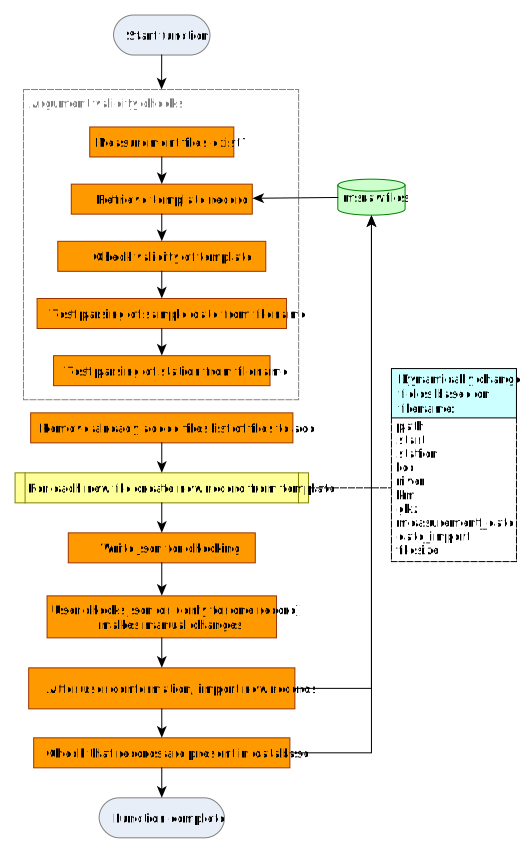
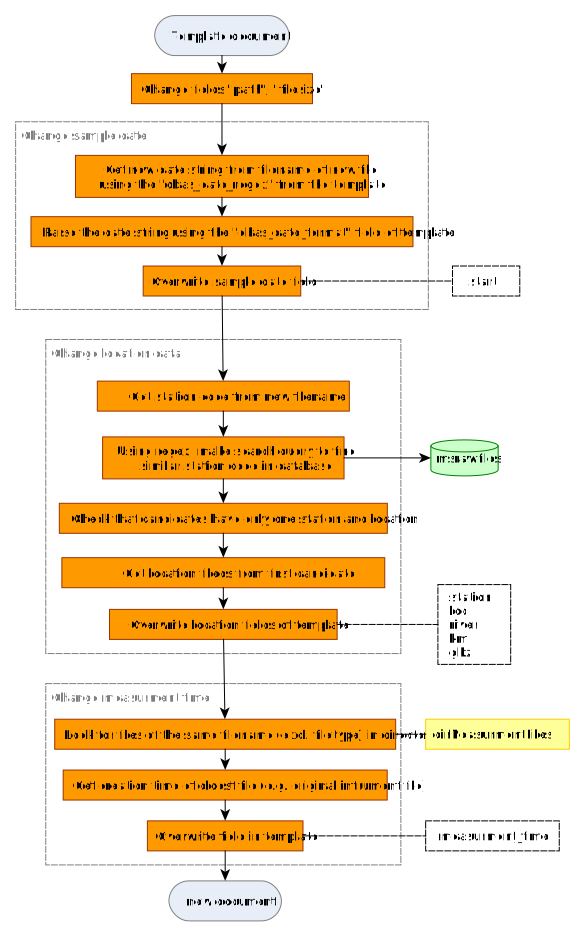
The function is designed to make adding new files to
msrawfiles as quick and error-free as possible. It works by
copying existing documents in msrawfiles as templates and
changing certain fields.
Special cases
The files being added have different measurement locations
addRawfiles() can dynamically change The location for
each entry based on the location encoded in the filename. The field
dbas_station_regex in the template document is used to find
documents from a matching location from existing entries in
msrawfiles. The location information is then copied from
these documents (station, loc,
river, km and gkz fields).
Use newStation = "filename" to copy location information
from other entries
addRawfiles(rfindex, "eIRBnYkBcjCrX8D7v4H5", newFiles[4:17], newStation = "filename",
             dirMeasurmentFiles = "~/messdaten/sachsen/")
Example filename:
OBF34910_20230821_Zschopau_pos.mzXML
Example dbas_station_regex: ^(OBF\\d{5})_