Dashboard development and backend
Dashboard-development.RmdSpectral library dashboard
Structural formula visualization

Front-end logic
A custom, Vega-lite Kibana visualization retrieves a PNG
image of a structural formula from
picture.ntsportal.bafg.de and renders it. The correct
structure is chosen based on the first document provided by the Kibana
search context. The inchikey field is extracted from the
document and used to build a URL which points to the correct structure.
For example, Edetol is at
https://picture.ntsportal.bafg.de/NSOXQYCFHDMMGV-UHFFFAOYSA-N.png.

https://picture.ntsportal.bafg.de/NSOXQYCFHDMMGV-UHFFFAOYSA-N.png
Back-end infrastructure
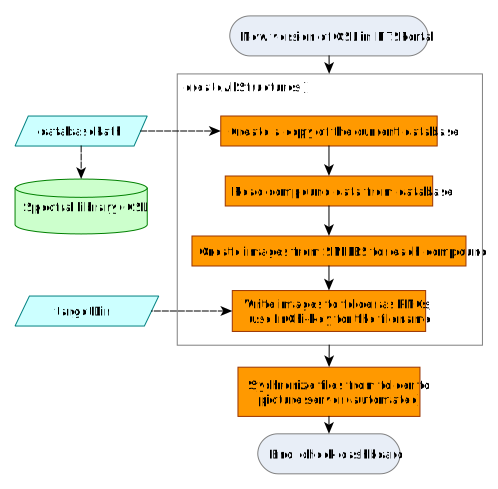
The PNGs are written asynchronously by
ntsportal::createAllStructures() to the picture server. The
PNG files are first saved to a designated folder and from there
synchronized automatically to the image server.
createAllStructures() produces the structural formulas of
all compounds in the CSL as PNGs. The PNGs must be updated with this
function by the NTSPortal administrator when a new CSL version is used
in NTSPortal.
createAllStructures consists of 4 steps:
- A copy of the CSL at
databasePathis created in a temporary directory. - The compound list is extracted from the SQlite
.dbfile with the help of theRSQlitepackage. - The SMILES code of each compound is converted to a structural
formula with the
rcdkpackage (requiresrJava). - The formulas are exported as
.pngfiles to thetargetDir– best a folder synchronized with the picture server, from where they can be accessed by Kibana. The file names are the InChiKeys of the substances.