Processing by non-target screening
processing-by-non-target-screening.RmdIntroduction
Measurement files are processed by two algorithms in NTSPortal, library
screening (dbas) and non-target screening
(nts), the later is described here. The results of both
processing algorithms are stored in feature tables in
Elasticsearch. Processing by nts only includes features
without a compound match in the CSL (i.e. unknowns). To achieve this,
nts processing includes an annotation step, but annotated
features (i.e. with a match in the CSL) are removed from the final
feature list (during the conversion to featureRecord step).
This removal does not include all possible adducts, in-source fragments
or isotopogues of a compound, since the CSL can not include all possible
permutations. Therefore, there may still be some duplication in the
results.
Processing by nts works analogously to dbas
and can be started with the same various screening*()
functions using nts as the screeningType
argument. The rest is the same as dbas: Results are
converted to a list of featureRecords and
saved as .RDS files. These are imported into the database
using ingestFeatureRecords().
Workflow details
File scanning
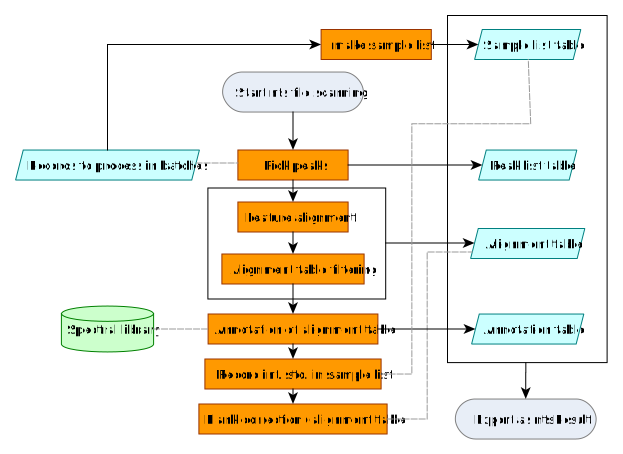
Files are processed together in batches. The processing algorithm
using functions provided by ntsworkflow and performs the
following steps:
- Peak-picking: An initial feature list is built by searching EICs for chromatographic peaks
- Feature alignment: Features are grouped across samples (m/z and similarity), building the alignment table
- Alignment table cleaning: The alignment table is filtered by different means, e.g. only keeping features found repeatedly in replicate injections.
- Annotation with the CSL: Using m/z, and MS² matching with with collective spectral library
-
Internal standards marked: The IDs of internal
standards are recorded in the sample list (for building the
featureRecord). - Blank correction: Features found in samples and field blanks (background) are removed from the alignment table. Internal standards are included in the field blank so they are also removed from the alignment table in this step (however, they remain in the peak list).
The result of this processing is a ntsResult object, a
list containing 4 tables (tbl_df objects).
| Name of table | Comment |
|---|---|
peakList |
Peaks (features) detected |
sampleList |
Table of measurement files and associated metadata |
alignmentTable |
Table of aligned features |
annotationTable |
Table of annotations of the alignmentTable (matches
with the CSL) |
Conversion to featureRecord
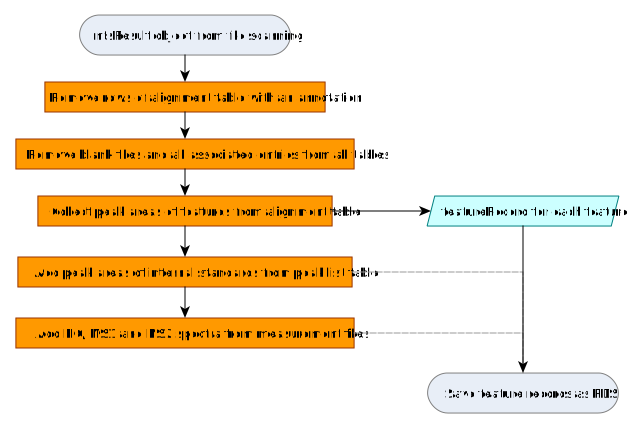
The ntsResult object is converted to a
featureRecord using a method of the
convertToRecord() generic. It includes the following
steps:
- Annotated rows of the
alignmentTable(those features with a match in the CSL) are removed. - Blank files and all associated features and data are removed.
- Peak areas of all features are collected from the
alignmentTable. - Peak areas of internal standard features are gathered from the
peakList. These were removed from the alignment table during step 7 of file scanning (but remained in the peak list table). The IDs were recorded in step 6 of file scanning. -
featureRecords are enriched with EICs, MS1 and MS2 spectra, which are collected from the raw measurement files. - The list of
featureRecords is saved as a.RDSfile.
Each featureRecord also includes the path to the
measurement file (to reference the msrawfiles entry and all
the associated metadata) and the feature table alias, which is used to
create the feature table in Elasticsearch.
The featureRecords are collected in a list
and saved as one RDS file per batch.