Processing by library screening
processing-by-library-screening.RmdIntroduction
Measurement files are processed using the library screening algorithm
known as DBAS (database assisted screening), described here, as well as
non-target
screening. All the parameters for processing, as well as the
location of the necessary input files, are stored in the
msrawfiles index. The output of DBAS processing is stored
in a feature index. See naming conventions of
indices.
Reprocessing all datafiles in msrawfiles index
After additions have been made to the spectral library all datafiles
must be reprocessed. After making necessary changes to the
msrawfiles table, processing can be started with the
various screening* functions depending on where the
processing should take place (locally, server etc.). For example,
screeningSelectedBatchesSlurm() is used to begin processing
using the SLURM workload manager.
Overview of processing algorithm
Connecting to ElasticSearch cluster
Saving the login credentials is achieved using
ntsportal::connectNtsportal(). This will also build the
connection object (the DbComm interface). Currently the
R/dbInterface-PythonDbComm.R methods are used to implement
the interface.
General workflow
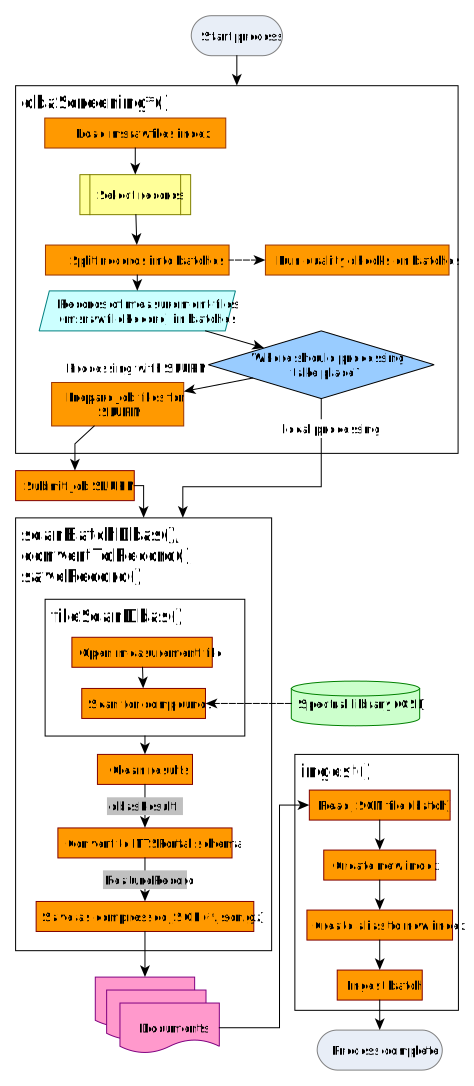
The HRMS measurement files are stored as mzXML files in the
filesystem, in directories representing batches (measurement sequences).
The files were previously converted from the vendor specific formats
(.raw, .wiff, etc.) using Proteowizard’s
msconvert-tool.
The msrawfiles table is used to manage the metadata.
Each measurement file has a record in this table which contains
information such as file’s path, sampling and acquisition information
and processing parameters.
The msrawfile-records are used to control the processing
workflow. Once the workflow is complete, the data is saved as a JSON
file in the format needed for Elasticsearch ingest (importing the data
into Elasticsearch). The ingest itself is done in a separate step.
Process launching
The user runs one of several screening* functions to
start the processing either locally or via SLURM. In
screeningSelectedBatchesSlurm() (the most commonly used)
specific directories (i.e. batches) containing the measurement files are
passed either by listing them directly or by giving a root directory.
dbas is the default screeningType in these
functions. For further details on selecting batches for processing, see
Section Collecting msrawfile
records.
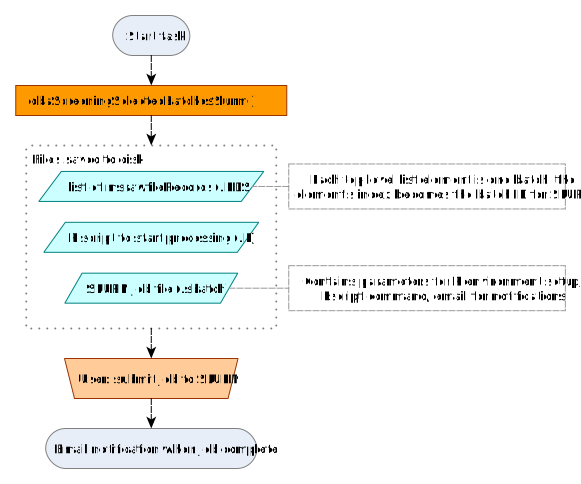
Processing using the workflow manager SLURM
To run the screening via SLURM, first the necessary job files are be
created. The user then starts the processing by submitting the job file
(.sbatch) to the workload manager via the sbatch command in
a BASH terminal.
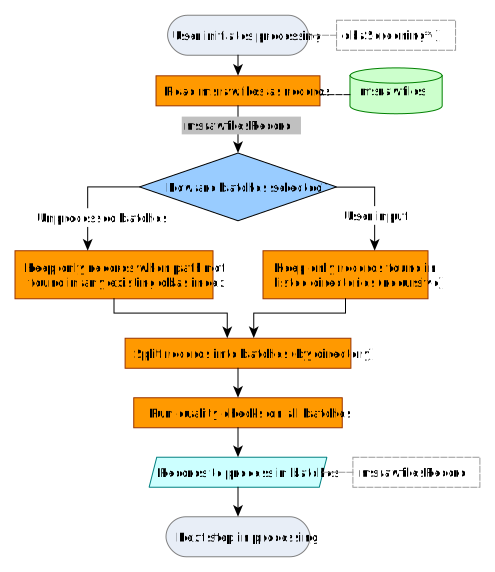
Collecting msrawfile records
The msrawfiles records are loaded and checks performed
before the scanning process begins. Output is a list of batches of
ntsportal::msrawfilesRecords.
File-wise scanning
The measurement files are scanned for compounds in the collective
spectral library (CSL) and the results are cleaned. The result is one
dbasResult object for the batch (list of
data.frames containing peak information for the whole
batch).
| Name of table | Comment |
|---|---|
peakList |
Peaks detected with MS2 |
reintegrationResults |
Peaks detected after gap-filling (with and without MS2) |
rawFilePaths |
|
ms1Table |
MS spectra |
ms2Table |
MS2 spectra |
eicTable |
Extracted ion chromatograms |
isResults |
Internal standard peaks |
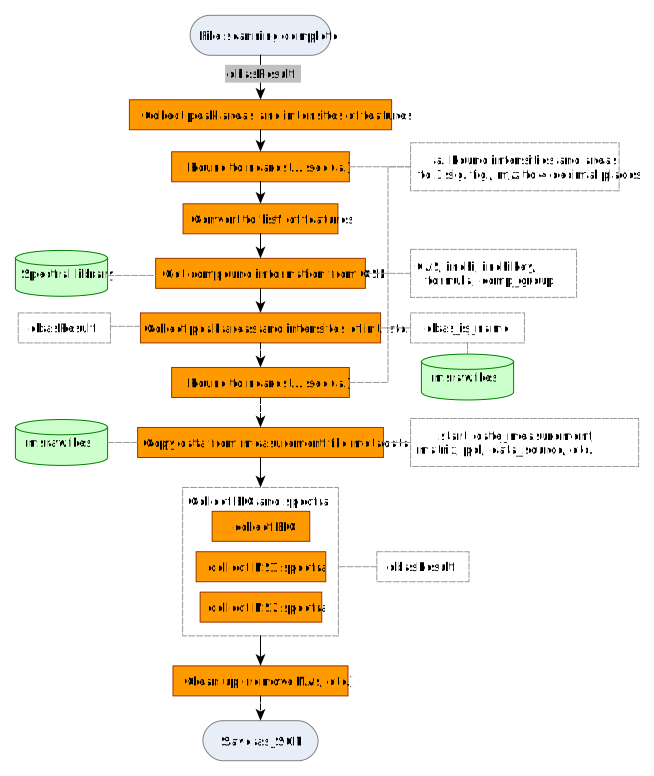
Conversion to featureRecord
The results from scanning (dbasResult) are converted to
a list format for later import into NTSportal
(featureRecord). Additional compound information is taken
from the spectral library and measurement file metadata is taken from
msrawfiles and added to each record. MS1,
MS2 spectra and the EIC of the peak are added if available
(only peaks in dbasResult$peakList have these data
available).
dbasResult
to a featureRecord
Writing RDS for database import
The list of featureRecord objects from one batch are
saved in an RDS file (using the default gzip
compression).
Database import (ingest)
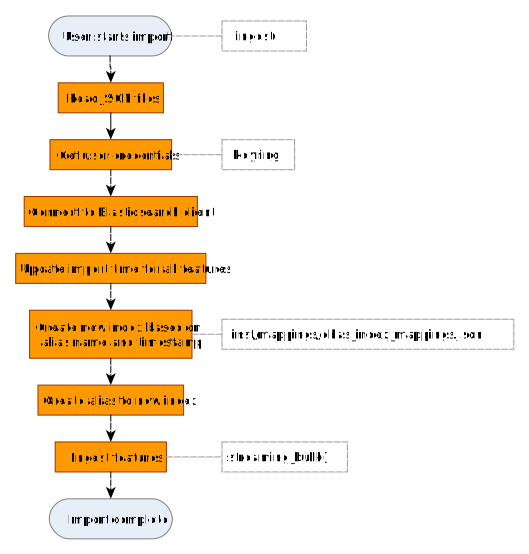
Before ingesting documents, the user must ensure that the enrich
policies and ingest pipelines are up to date. This is done with
updateEnrichPolicies(), which will synchronize
Elasticsearch with the current enrich policies and ingest pipelines
needed for ntsportal.
The RDS files are imported into NTSPortal with
ingestFeatureRecords(), which calls the Elasticsearch bulk
ingest API via Python. The user runs ingestFeatureRecords()
separately after processing is complete. The ingest includes a pipeline
(ingest-feature) which enriches each document with sample
metadata found in msrawfiles. These are the fields such as
sampling location and sampling time, loc and
start fields, respectively.
ingestFeatureRecords()